introduction
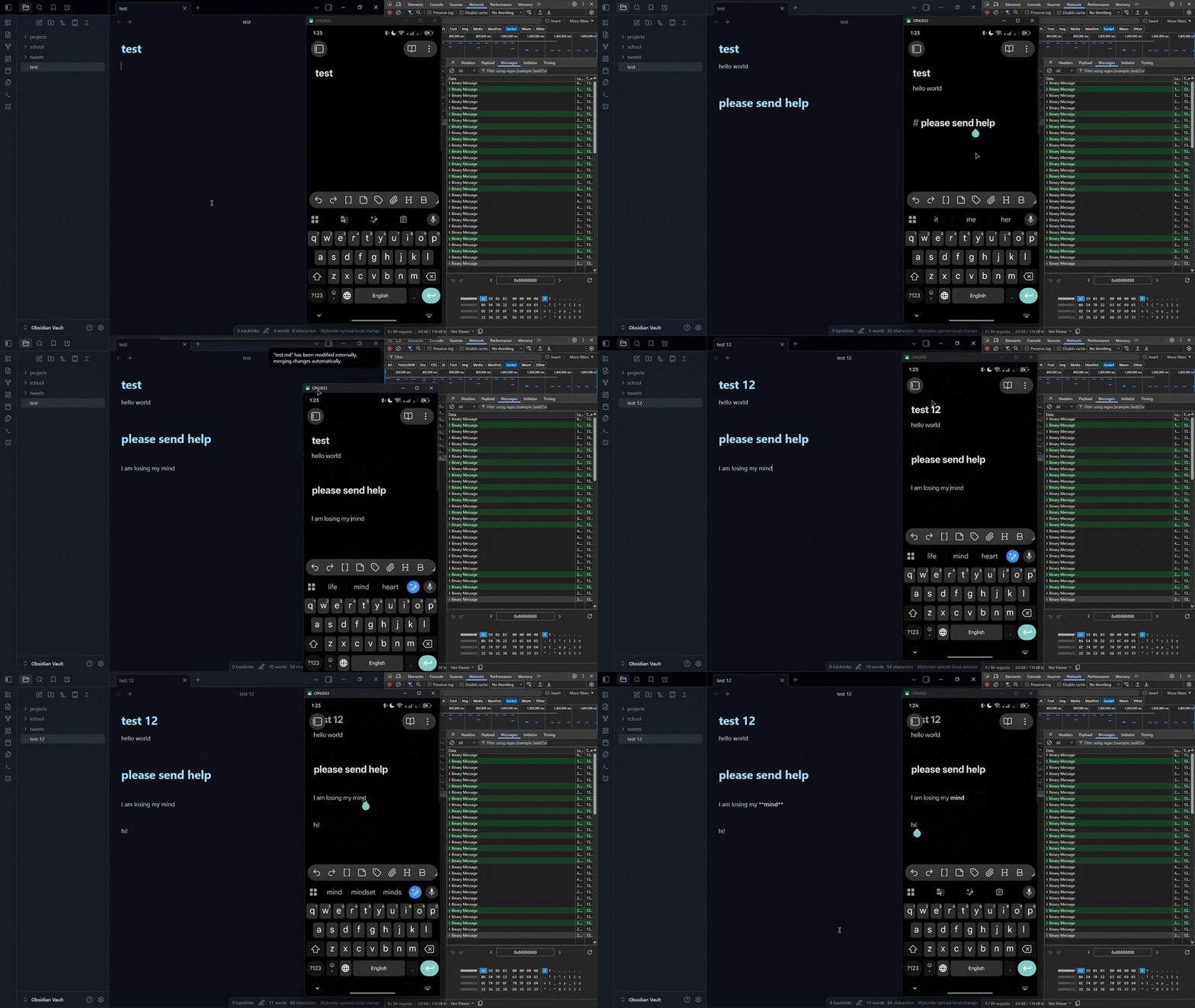
people always told me to "just write it down", but i never listened. i kept everything in my head. im not sure why - maybe pride, that i didn't need no paper to remember things, maybe laziness. but what if it was just the lack of a good sync solution?
previously, i tried doing notes on my phone, but it's really annoying when you suddenly need to get it on your pc. my usual workflow was to copy and send it as a telegram message to myself. but then when you edit it on your pc you need to do the same thing back. it was terribly inefficient. i explored existing solutions such as syncthing, for example, but it was never good enough for my liking. and i refused to pay for obsidian sync, as i already pay enough for multiple vpses and a local server (in electricity bills)
so i built my own: a self-hosted, end-to-end encrypted obsidian sync server that runs on hardware i'm already paying for
server-side
i began by initializing a new repo. for the server-side my language of choice was rust as it is known for being reliable, memory-safe, and, most importantly blazingly 🔥 fast 🚀
my focus was ease of deployment, transparency (i hate stinky "just run my remote bash script to install"), and native obsidian integration. i specifically didn't want any p2p as it would require two devices to be online at the same time and introduce other issues (such as when your network blocks it for example)
protocol
the server would handle vaults, authentication and storage. but before writing the server itself, i decided to create a separate rust crate for my protocol abstraction. most of the work (pushing ops, blobs, snapshots, pairing) goes over a signed http rest api, but for live updates i didn't want the overhead of http - so the websocket talks in frames instead. a frame is a small binary packet with a fixed structure:
[MY][version][message type][flags][payload length][...payload...]
the MY at the start (two bytes) is used to identify a mylonite frame. each frame is typed (client sends things like Hello, OpPush, Ping and the server responds w/ HelloAck, OpBroadcast, Pong, ...)
i made this decision because both server and plugin share the same protocol crate, so there's a single source of truth for the wire format on both sides
deployment
as i mentioned before, i really wanted to make the server easy to deploy, so i made it compile to a single, self-contained binary, which you can just drop on your server and forget. i also made a set of commands to initialize the server and create a new vault easily:
mylonite init- writes a default config, creates the first vault & prints a pairing tokenmylonite serve- runs the servermylonite vault create | list | deletemylonite device list | revokemylonite stats
later on i also made it so that it spins up a loopback api, so that you can manage a live, running server without restarting it
hosting
exposing all this used to mean port forwarding and fighting with tls certs, but cloudflare tunnels made it really easy. one command and the self-hosted server is reachable over https without opening a single port
e2ee
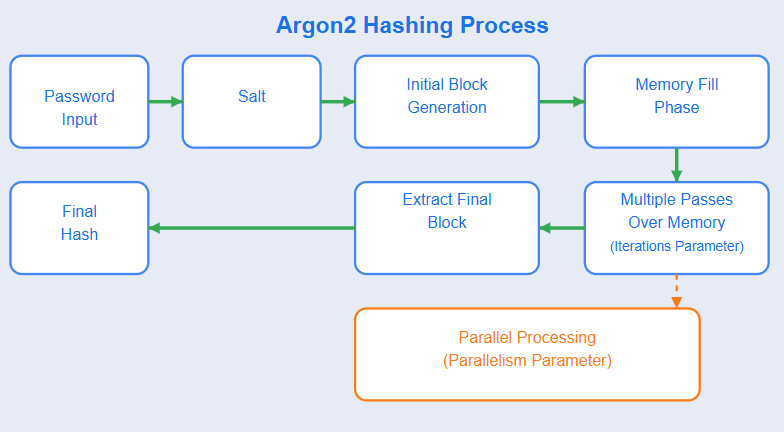
your vault passphrase is run through argon2id. it's a modern standard released in 2015. one could say it's similar to bcrypt, but when i was choosing standards, my friend geepeetee told me it's much much harder to crack (i set it to chew through 64mb of ram per attempt, which is expensive these days!)
here's a neat visualization i found online:
from the master key, four separate keys are derived via hkdf:
opKey- used to encrypt a history of changes (little jsons describing changes)blobKey- encrypts the actual filesblobIdKey- derives each file's storage name as a keyed hash (it's actually really cool because it also acts as a dedup, and an attacker cannot probe whether a specific file exists in my vault)snapshotKey- encrypts periodic full snapshots of vaults (makes it easier to bootstrap new devices)
this way if one key leaks, an attacker cannot decrypt the vault without the other keys, plus each key has its own job - and since they're derived separately, they can be rotated independently (right now everything is pinned to key version 1, but i could implement that in the future)
additionally, all encryption uses XChaCha20-Poly1305. its an Authenticated Encryption with Associated Data (AEAD) Algorithm, where "Authenticated" stands for it being able to detect tampering: e.g. if someone modifies the ciphertext on server the decryption will fail. also due to AAD (Associated Data) you cannot take an op's ciphertext and replay it as a different op
each device also has an ed25519 keypair as its identity - it signs every request, so the server can verify it's really that device (the same kind of key you use to sign commits or ssh into a host)
the obsidian plugin
it was my first time making obsidian plugins, i tried to design it that way so that it integrates really nicely
first of all, a plugin is just a typescript module inside of obsidian. it exports a class that extends Plugin and calls onload() when the plugin is enabled. from there you just use the api to hook into things like the editor, commands, and events
i decided to split my plugin into modules, making it easier to maintain and extend:
crypto.ts- all the key and cipher stuff from aboveprotocol.ts- the typescript side of the frame formatapi.ts- the rest client that signs every request before sending itsync-codec.ts- handles encryption on the way out, decryption on the way insync-engine.ts- watches vault events and decides what to push, pull and applysnapshot-service.ts- makes encrypted snapshots so a new device doesnt have to replay the whole history
sync engine
the sync engine is where the magic happens: when a file changes it fires an event that the engine picks up, figures out what actually changed, and hands off to the codec to encrypt before pushing it to the server
it all sounds simple before you actually have to account for conflicts - what if two devices change the same file at the same time? or if both devices were offline and then come back online? if you were to use simple "last-write-wins" for your conflict resolution, you could end up with data loss, which is unacceptable
so i had to come up with a better strategy. markdown files go through yjs, a CRDT (conflict-free replicated data type), which basically lets two diverging copies merge on their own without losing anything:
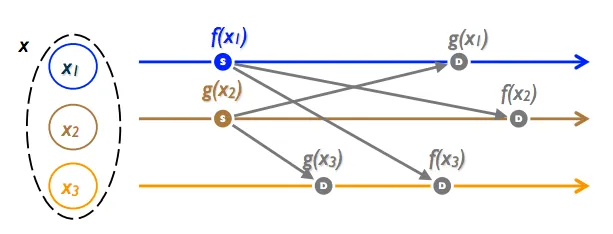
this allows me to safely apply diverging edits to files. and in case of anything unhandled by the plugin it creates a copy of the conflict, so no data loss is possible
it would be a little generous to call it a perfect merge though: right now when a file changes yjs gets the whole new content instead of the exact characters that changed. that means two truly simultaneous edits to the same file can come out with some duplicated text rather than a clean interleave. it never loses anything, which was the whole point, but i still wanna do some proper character-level diffing
subsequently (after v2 update) i also made it record events such as file renames, moves, creates and copies, so it's also handled well
device pairing
how does a new device get the vault passphrase, without the server ever seeing it, and without user retyping the 64-char secret on a phone?
first device is bootstrapped with the pairing token (that prints when you create your vault on the server), and it's the one device that actually generates the vault keys. everything after that is just getting those keys onto a new device safely
my first prototypes were embarrassing. the invite was the whole secret as one long phrase, and to get it onto my phone i'd... send it to myself on telegram. the exact thing i built this whole project to avoid, except now i was pasting an encryption key into a chat app in plaintext. really bad 👎
so i added short invite codes instead. better, but you still had to type them out by hand, which sucks on a phone
then i looked at how signal handles device linking and came up with a better solution: the new device makes a one-time keypair and shows a qr code (which my server can actually host as a little page, so you just scan it). both devices do an x25519 diffie-hellman handshake - they end up with the same shared secret without ever sending it. the already-paired device uses that secret to encrypt the passphrase and hands it off through the server. so the entire thing goes through the server, but the server itself only ever sees ciphertext
to prevent MitM (Man-in-the-Middle) attack, both devices show a six-digit safety code derived from the handshake. you just check that they match before approving - if someone were to swap the keys halfway through, the codes wouldnt match. (small thing im proud of: i uppercase the invite link so the QR uses its compact alphanumeric mode and stays small)
websockets
i mentioned the websocket frame channel up in the protocol section, but here's the backstory on why it exists. at first the plugin was just polling the server every so often to check for new changes. it worked, but the latency was killing me, i knew i could do better. so that's what the frames are for - the server pushes changes the moment they land, instead of me asking over and over. i still left polling in as a fallback though, in case the socket drops
conclusion
i released mylonite not so long ago and have been using it since. it just works - i save on my phone and it's on my pc before i switch windows
that said, this isn't for everyone. it's self-hosted, so you need a server and you need to be the kind of person who's into running their own stuff. if that sounds like a chore rather than fun, this probably isn't your thing - and that's fine, it was scoped at nerds like me
also since it's e2ee, the server only ever holds ciphertext (and some metadata like how many files/ops you have, etc), so if you lose every paired device, your data is GONE, forever. there's no "forgot password" - that's the whole point of e2ee, but it's a real consequence, so keep a device paired
it's still early and may undergo some changes, but it's open source and you can check it out here
thanks for reading!! this is my first time writing something like this
comments
0 comments